Table of Contents
Introduction to Design Patterns in Apex
Design patterns aren’t fancy tools or Salesforce add-ons—Design Patterns are just practical ways developers have figured out to solve recurring problems. Design Patterns have been around for decades in the object-oriented programming world, and for good reason. When you’re working in Apex, where governor limits are always looking over your shoulder, these patterns help keep your code clean, predictable, and easier to maintain.
In real Salesforce projects, complexity builds fast. Multiple developers touch the same classes, business requirements evolve, and suddenly the code starts feeling heavier than it should. Apex Design Patterns give teams a shared structure so everyone speaks the same architectural language. It doesn’t eliminate complexity, but Design Patterns definitely make it more manageable.

Most patterns fall into three familiar categories:
- Creational Patterns: These Design Patterns determine how objects are created (e.g., Singleton, Factory)
- Structural Patterns: These patterns determine how classes and objects fit together (e.g., Adapter, Decorator)
- Behavioral Patterns: Behavioral patterns decide how objects communicate and share responsibilities (e.g., Strategy, Observer)
In Salesforce—where triggers, DML rules, and multi-tenant limits shape how your code behaves—these patterns turn scattered logic into something you can actually measure and scale.
Why Use Design Patterns in Salesforce Development
Salesforce development isn’t exactly like building a traditional app. You’re working on a shared platform with strict limits and a heavy emphasis on data. Because of that, Design Patterns go from “good practice” to “practically required” very quickly.
1. Enhanced Maintainability and Readability
In any medium to large-sized Salesforce org, clean structure is gold. When a team sticks to patterns like Service Layer or Strategy, you don’t have to wade through a mess of unrelated code just to find what you need. You know what the rules are, where the data resides, and how the process flows. New developers appreciate this more than anyone.
2. Improved Testability (Separation of Concerns)
Design Patterns push you to keep things organized—no more jamming SOQL, business rules, and UI logic into one spot. The payoff shows up during testing. Test classes run faster, and the whole setup is more stable.
3. Maximizing Reusability
Design Patterns keep classes focused. A Factory deals with object creation. The Service Layer runs the show, handling workflows. Repositories handle all the data-related tasks. With this setup, it’s much easier to reuse logic across triggers, flows, batch jobs, or LWCs.
4. Governor Limit Compliance and Scalability
Salesforce limits are brutal. They don’t care even if you’re racing against the clock. Design Patterns help avoid the following classic mistakes:
- Trigger logic running more than once
- SOQL in loops
- Repeated DML operations
Using a Trigger Framework or Unit‑of‑Work approach keeps things bulkified and efficient. That’s not just a “best practice”—it’s a survival tactic.
Salesforce Limitations Addressed by Design Patterns
Salesforce is powerful, but it comes with constraints. Ignoring them leads to fragile code that becomes harder to fix over time. Design Patterns help soften the edges.
1. The Trigger Conundrum
Anyone who’s worked in a busy org has seen a messy, overloaded trigger. It works… until it doesn’t.
Pattern Fix: A Trigger Framework moves everything into handler classes and leaves the trigger as a simple router. This prevents you from encountering recursion problems, protects your core logic, and makes testing significantly easier.
2. Dependency Management and Tight Coupling
If you tie one class directly to another, your whole system stiffens up. Change something in one spot, and suddenly you’re fixing things everywhere.
Pattern Fix: Factory and Dependency management remove that tight coupling. The code depends on interfaces rather than concrete classes, which keeps things flexible when requirements shift—as they always do.
3. Governor Limit Volatility
When you spread SOQL or DML calls throughout your business logic—especially inside loops—you’re pretty much asking for governor limits to be hit.
Pattern Fix: Repositories pull all your data access into one place. The Service Layer coordinates those calls and can apply caching or Unit‑of‑Work techniques to stay within limits.
4. Custom Settings/Metadata Dependency
Querying Custom Settings or Metadata repeatedly is an easy way to crash SOQL queries without realizing it.
Pattern Fix: A Singleton loads configuration data once and reuses it for the rest of the transaction.
Practical Insights from Real Projects
A few things you only learn after building and maintaining real Salesforce implementations:
- Skipping design patterns feels faster at first, but you pay for it later. The quick “just put it in the trigger for now” fix always turns into technical debt.
- Most governor limit issues come from a missing structure. When data access and logic aren’t centralized, limits get hit in the least expected places.
- Singletons save more queries than you’d expect. Especially in integrations or orgs with lots of feature toggles.
- Repositories make refactoring much easier. When Salesforce adds new fields or requirements change, having a single place for queries is a lifesaver.
- Trigger frameworks are essential in multi-developer teams. They prevent chaos, merge conflicts, and accidental recursion.
- Design Patterns help new team members settle in quickly. With a clear architecture, onboarding becomes less about hunting code and more about understanding the business logic.
- Design Patterns don’t eliminate chaos— they control it. Even well-structured code needs occasional workarounds thanks to Salesforce quirks, but patterns reduce how often you run into trouble.
Trigger Framework Pattern
If you’ve spent any time in Salesforce development, you’ve probably run into the dreaded “Trigger Soup.” It starts small—a single trigger with a few lines of logic. Fast forward a few months, and suddenly that trigger is a monster: hard to read, painful to maintain, and, based on what we’ve seen in plenty of orgs, a governor-limit-error magnet. Does this sound familiar? That’s exactly what the Trigger Framework Pattern is designed to fix.
What’s the Big Idea?
Here’s the idea: keep your triggers light and let the handler classes handle the real work. Picture the trigger as a traffic cop. It directs things where they need to go, but it’s not getting behind the wheel. Basically, the trigger should just do two things—spin up an instance of the handler class, then call the right method depending on whether you’re dealing with before or after events, inserts, or updates.
Stick with this pattern, and your triggers stay simple, tidy, and way easier to manage.
Why do teams like this so much?
- Centralized Control: You only run your logic once per context. No more accidental loops, since you keep track with a static flag.
- Bulkification: Since handler methods take List<SObject>, you naturally write bulk-safe code. Salesforce practically begs you to do this, and this pattern makes it hard to forget.
- Testability: Your business logic lives in a plain Apex class, so you can test it using mock data. No more wrestling with trigger context in your tests. Developers and QA folks breathe a little easier.
- Decoupling: Logic for a specific object doesn’t get tangled up with the dispatch stuff. You can drop this framework onto other objects without rewriting everything.
How It Usually Looks:
Most implementations use an abstract base class or interface with methods like beforeInsert or afterUpdate. Each object gets its own handler class—AccountTriggerHandler, for example—that implements those methods. The trigger just calls the right one based on the context. It’s a clean, predictable approach that scales well. In many projects, this pattern becomes the backbone of all trigger logic.
If you’re thinking, “This sounds like extra work,” trust me—it pays off the first time you need to add new logic without breaking everything else.
Singleton Design Pattern
You’ll often see the Singleton Pattern in Apex when teams want to avoid repeating expensive operations. It’s not just a design choice—it’s a practical way to optimize performance and prevent the system from hitting the governor limits. From what we’ve seen, this pattern is almost a given in large implementations.
How It Works
- Private constructor so nobody can call new.
- Static variable to hold the single instance.
- Public getInstance() method that checks if the instance exists. If not, it creates one. If yes, it returns the existing one.
Why It Matters
Repeated queries or heavy operations can kill performance. Singleton helps you avoid that by caching data or managing shared state within a transaction. In many teams, this pattern is used for configuration management or logging because those operations happen everywhere.
Where It Fits
- Configuration Manager: Cache settings or metadata so you don’t hit SOQL every time.
- Unit of Work: Track all planned DML operations and execute them in bulk at the end.
- Logging: Collect logs centrally and insert them in batches instead of doing it one by one. This is something we’ve observed that saves teams a lot of time and headaches.
If you’ve ever wondered why your org is hitting query limits, this pattern might be the missing piece.
Factory Design Pattern
Factory Design patterns are about centralizing object creation. Instead of hardcoding which class to use, you ask the factory pattern, and it decides. This keeps your code flexible and clean, which is something most teams appreciate when requirements change frequently.
Why It Matters
It decouples client code from concrete implementations. The client says, “Give me an object,” and the factory figures out which one to return. This is especially useful when you have multiple implementations of the same interface.
Common Scenarios
- Polymorphic Logic: Different Account types need different processors? The factory pattern picks the right one based on Account Type.
- Testing: It returns real or mock objects depending on whether Test.isRunningTest() is true or false.
- Integrations: Choose the right connector (SAP, Oracle, etc.) based on configuration without exposing details.
In many projects, factory design patterns become the backbone of integration layers because they make swapping connectors painless.
If you’ve ever had to rewrite code just to switch an integration, you’ll appreciate this pattern.
Strategy Design Pattern
A Strategy Pattern is used for flexibility. You define a family of algorithms, wrap each in its own class, and swap them at runtime: no hardcoding, no messy if-else chains. This design pattern really helps when business rules keep changing, and you need flexibility.
Here’s the gist: You set up a strategy interface with a shared method – Each strategy class takes that interface and runs its own algorithm. The context class just points to the current strategy and lets it do the work. When is a good time to use it? Anytime you’ve got a few ways to get something done and need to swap them in and out without messing with the core code. It’s especially handy when logic changes all the time.
A few real-world uses:
- Discount calculation: Gold, Silver, Bronze—each gets its own rules.
- Lead assignment: Maybe you assign based on geography on one day, and on revenue the next day.
- Validation: When validation rules get complicated and change often, these design patterns keep things manageable. If you’ve ever had a client say, “We need to change the discount logic again,” this pattern will save your sanity.
Why These Design Patterns Matter
In many Salesforce orgs, these Design Patterns aren’t just “nice to have”—they’re essential for keeping code maintainable and scalable. Without them, you’ll often find teams struggling with triggers that break during bulk operations, logic that’s impossible to test, and integrations that are hard to swap out. Based on what we’ve seen, adopting these patterns early saves a lot of pain later.
They make onboarding a breeze:
New developers aren’t stuck hunting around, trying to figure out where the logic hides—they just follow the structure and get to work. And when requirements shift (because, let’s face it, they always do), you can adjust things without tearing apart your whole codebase. If you want your Salesforce org to stand the test of time, these Design Patterns are well worth the time spent on their installation and usage.
Service Layer Design Pattern:
Basically, it’s a set of classes that handle your business logic and manage transactions. This layer sits right between “something happened” (like a trigger firing, an API call coming in, or someone clicking a button) and “what needs to happen next” (running queries, making updates, sending notifications, or kicking off integrations). Picture it like an air traffic controller—it’s not responsible for flying the planes, but it makes sure that everything moves smoothly and safely.
Why Bother?
Two reasons: separation of concerns and transactional integrity. Without these, the logic ends up scattered across triggers, controllers, and random utility classes. It works for a while, but when requirements change, you’ll be untangling spaghetti code. And trust me, that cleanup process is never fun to be involved with.
Here’s what a good Service Layer does:
- It owns the business logic. This is where the “why” and “what” live. For example, when an Opportunity moves to Closed Won, create a Service Contract and notify the Sales Manager. I’ve seen this hardcoded in triggers—it feels quick, but later you’ll need the same logic in a batch job or an API call. That’s when this causes pain.
- Take clean inputs. IDs, DTOs, Maps—keep it simple. Avoid relying on trigger context variables directly. This makes services reusable and tests predictable. A neat trick: design services to accept lists of IDs instead of raw SObjects. It’s much cleaner.
- Delegate data access. Don’t sprinkle SOQL and DML in your service methods. Call a repository instead. Centralizing queries means you can optimize them and reuse them everywhere.
- Manage the transaction. Services should handle everything for a single business process—updates, external calls, and error handling. If something fails, they decide what happens next. Ever debugged half-completed updates because one part succeeded and another blew up? This feature takes care of that issue and prevents the occurrence of such events.
Why It Works in Apex
- One source of truth. All complex processes live in one place. Whether called from a trigger, LWC, Flow, or API, the logic remains consistent.
- Cleaner triggers and controllers. Triggers just dispatch records; UI logic stays focused on presentation.
- Better testing. Services that take clean inputs are easy to simulate. You can test complex flows without hitting the database every time. Huge time-saver when you’re racing a deployment window.
Pro tip: define service boundaries around business outcomes, not CRUD actions.
Repository Pattern
The Repository Pattern is your data access specialist. It separates business logic and keeps queries in one place. In Apex, this is critical because the governor limits penalize inefficient queries.
How It Works
- Strict isolation. Services never run SOQL or DML directly. If you’re tempted, stop—it’s a sign you need a new repository method.
- Interfaces first. Define something like IAccountRepository with methods like findById(Id) or save(List<Account>). Services code against the interface, not the implementation.
- Concrete classes. Implement the interface in AccountRepository. That’s where your SOQL, SOSL, and DML live.
- No business logic. Repositories fetch and store data. No validation, no branching. Keep them clean.
Why It’s Worth It
- Testability. Mock repositories make unit tests fast and reliable. No need to hit the database.
- Query optimization. All queries for an object live in one place. Easier to bulkify and tune.
- Flexibility. Need caching or an external DB later? Swap the repository implementation without touching service logic.
Tip from experience: design repository methods around intent, not just object names. “Find open opportunities for these accounts” is better than “get opportunities by account.”
Putting It All Together
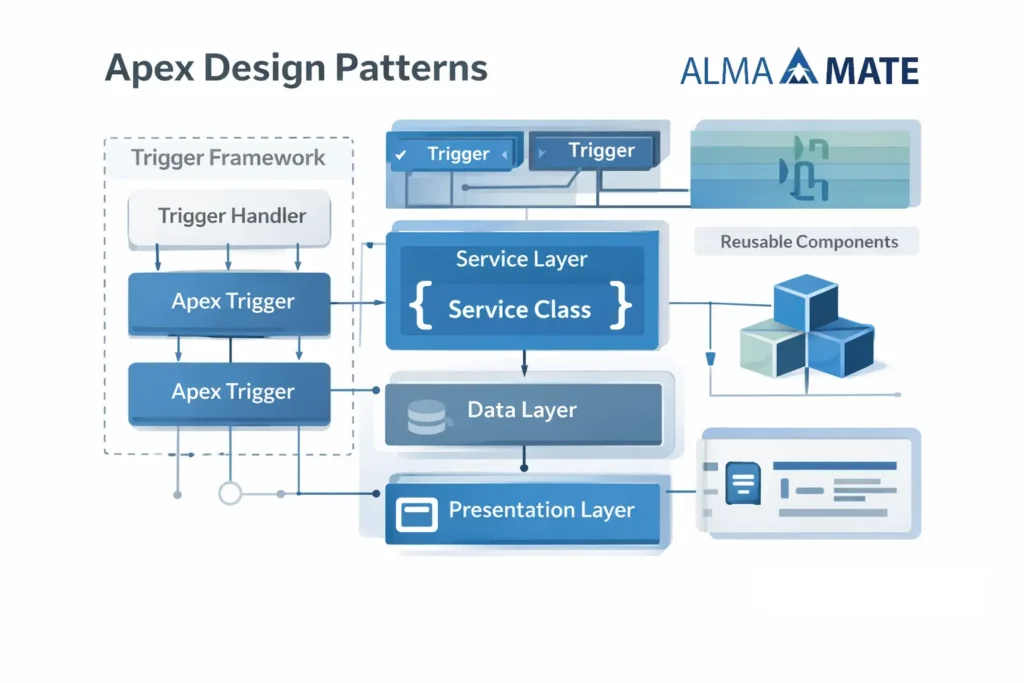
Big Apex apps don’t rely on one pattern—they combine several Design Patterns. A layered approach keeps things structured and maintainable. Here’s the usual stack:
1) Trigger/UI Layer
Handles input from triggers, LWCs, or APIs. Triggers should be tiny—validate context and call the right service. If you’ve ever seen a 500-line trigger, you know why this matters.
2) Service Layer
The orchestrator. It decides what happens, in what order, and how to handle errors. It might use the Strategy Pattern for complex logic, call repositories for data, pull config via a Singleton, and track DML through a Unit of Work.
Reality check: Salesforce limits are strict. Services should think in bulk, defer writes until the end, and avoid re-querying. Also, plan for retries and idempotency—users double-click, external systems retry.
3) Repository Layer
Handles all data access. Executes optimized SOQL and returns SObjects. Consolidates queries so you don’t end up with N+1 problems.
4) Utility/Factory Layer
Factories create the right service or repository at runtime. Singletons manage shared resources like config or logging. Feature flags? Use them. They’re lifesavers during phased rollouts.
Practical Notes from Real Projects
- Think bulk by default. Even if you’re coding for one record, design for 200.
- Idempotency matters. External systems retry. Make sure your logic can run twice without duplicating data.
- Error handling isn’t optional. Decide what gets surfaced to users and what gets logged.
- Enforce CRUD/FLS. Don’t assume the UI did it.
- Telemetry helps. Log what services ran, how many records, and what failed. It saves hours during troubleshooting.
- Keep repositories clean. No “quick logic” there. If behavior varies, that belongs in a service.
- Async wisely. Queueable and Batch are great, but don’t hide critical updates in async flows without planning for consistency.
And yes, I’ll repeat this because it’s that important: think bulk. It’s the difference between passing tests and passing production.

The Payoff
When you adopt these design patterns, you get:
- Better testing. Layers are isolated, services are mock-friendly.
- Scalability. Bulkification and query optimization become habits.
- Extensibility. Adding features doesn’t mean refactoring everything.
- Maintainability. Clear separation makes debugging faster and safer.
This isn’t theory—it’s what keeps large Salesforce orgs sane. It’s how you move from “code that works today” to “architecture that lasts.” And trust me, after a few release cycles, durability matters more than speed.