

 Jul 20, 2026
 8 min read


Every nonprofit starts with a “hero” spreadsheet. In the early days—when your donor base fits on a single screen and your “team” is just two people in a coffee shop—using Excel or Google Sheets feels like magic. They are free, they are familiar, and they don’t require a degree in computer science to operate. You can color-code your donors, add columns on a whim, and keep everything tucked away in a neat little file.
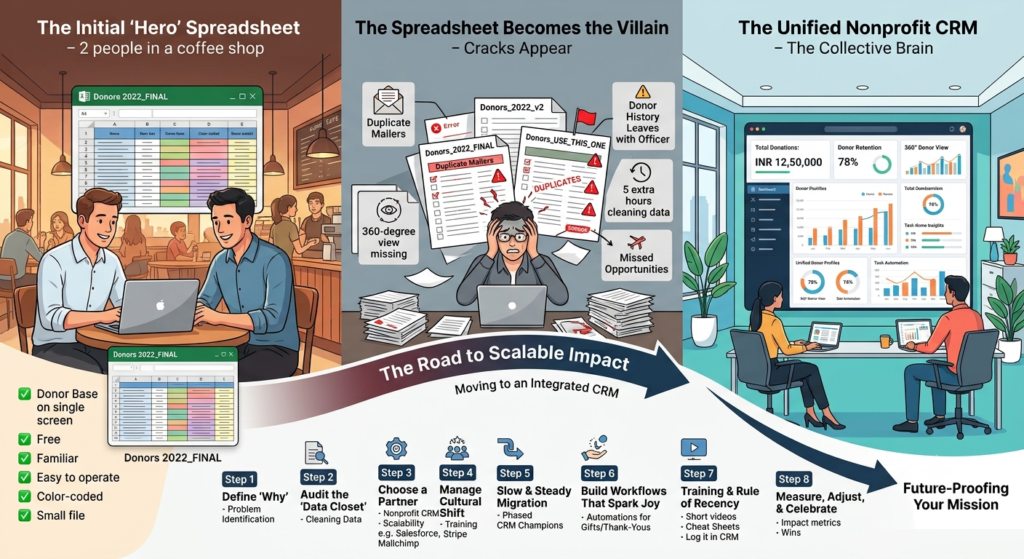
But as your mission gains momentum, that hero spreadsheet slowly transforms into a villain.
You start noticing the cracks: a donor gets three identical mailers because their name was entered three different ways. A major gift officer leaves the organization, and their entire history of “coffee chats” and “personal interests” leaves with them because it was stored in a private document. You spend your Monday mornings “cleaning the data” instead of talking to the community.
At some point, every modern nonprofit faces a hard truth: You cannot scale your impact on a system built for accounting. Moving to an integrated CRM (Customer Relationship Management) platform is much more than just a tech upgrade.
The Hidden Cost of “Making Do” With Spreadsheets
We often stick with spreadsheets because they feel “safe” and “free.” But the reality is that they are incredibly expensive in terms of lost time and missed opportunities.
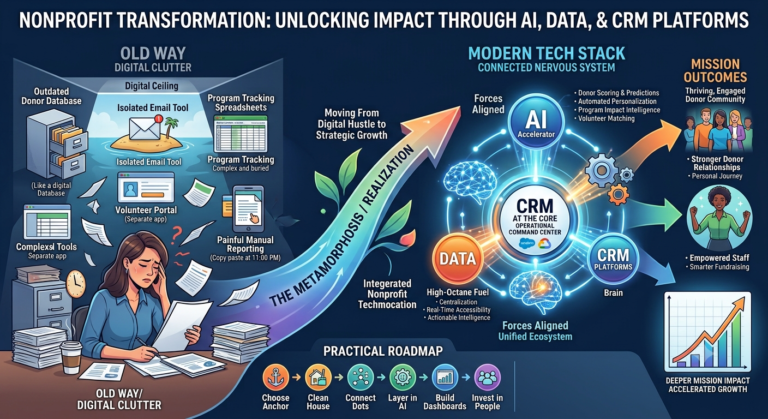
When your data is scattered across five different sheets, you lack a 360-degree view of your supporters. You might know what they gave, but you don’t know why. You don’t see that the donor who gave INR 2500 last week has also volunteered 50 hours and attended every gala event for three years. Without that context, you treat a “super-supporter” like a stranger.
A CRM solves this by acting as the organization’s “collective brain.” It centralizes donor data, automates the soul-crushing manual tasks, and provides real-time insights that help you work smarter, not harder. However, the transition can feel like a mountain to climb. Here is a pragmatic roadmap to getting it right.
Step 1: Define Your “Why” (Before You Look at Software)
The biggest mistake nonprofits make is shopping for software before they’ve defined their problems. If you don’t know what you’re trying to fix, you’ll end up with a high-priced tool that nobody knows how to use.
Sit your team down—not just the leaders, but the people who actually touch the data every day—and ask:
- “If you could outsource one tedious responsibility, what would it be?”
- “What information do we wish we had at our fingertips during a donor meeting?”
- “If we had five extra hours a week, what would we do with them?”
Your “why” might be increasing donor retention, simplifying year-end tax receipts, or tracking volunteer hours. Whatever it is, write it down. This list becomes your guiding light. When a software salesperson tries to sell you a “fancy AI predictive modeling feature,” you can look at your list and say, “That’s cool, but will it help us send thank-you notes faster?”
Step 2: Audit the “Data Closet”
Before you move into a new house, you declutter your attic. The same goes for your data.
Most nonprofits have “The Data Closet”—a collection of spreadsheets such as Donors_2022_FINAL, Donors_2022_FINAL_v2, and Donors_USE_THIS_ONE.
This is the most time-consuming phase, but you cannot skip it. You need to:
- Identify the Source of Truth: Which sheet is actually the most accurate?
- Standardize: Ensure “Block” isn’t “Blk.” in half your entries and “Blck” in the others.
- Purge: If someone hasn’t given, volunteered, or opened an email in seven years, do you really need to migrate them?
Pro Tip: Clean data is more important than “all” the data. It is better to start your CRM with 500 perfect records than 5,000 messy ones.
Step 3: Choose a Partner, Not Just a Product
Not all CRMs are built for the nonprofit heart. A generic sales CRM might be great for selling widgets, but it won’t understand “soft credits,” “matching gifts,” or “grant cycles.”
Look for platforms like Salesforce Nonprofit Cloud or other dedicated nonprofit systems. When evaluating, look past the price tag and consider:
- The Ecosystem: Are there YouTube tutorials? Is there a community forum where you can ask questions?
- Scalability: Will this tool still work when you’re 10 times your current size?
- Integrations: Does it play nice with your email marketing tool (like Mailchimp) or your donation processor/payment portal (like Stripe)?
Step 4: Manage the Cultural Shift
This is the “human” part of humanizing your article. A CRM launch is 20% technology and 80% psychology.
Your staff might be nervous. To them, a CRM feels like “more work” or “big brother watching.” You need to frame the transition as a gift to the team. Show them how the CRM will:
- Stop them from accidentally double-calling a donor (saving them from embarrassment).
- Automate the reports that they usually spend all Sunday night building.
- Make it easier for them to take a vacation because their notes are in a shared system.
Encourage the “CRM Champions”—staff members who are excited about the change—to help train their peers. Change is easier when it comes from a colleague rather than as a mandate from the top.
Step 5: The “Slow and Steady” Migration
Moving everything on a Friday and starting fresh on Monday rarely works. It’s too stressful.
Instead, try a phased migration. Move your “Major Donors” first. See how their profiles look. Are the fields in the right place? Can you find their phone numbers easily? Once you’ve tweaked the layout, move the rest of the database. This “test-and-learn” approach prevents small errors from becoming organization-wide disasters.
Step 6: Build Workflows That Spark Joy
Once your data is in, it’s time to make the CRM work for you. This is where you set up Automations.
Imagine this: A donor gives INR 2000 on your website.
- Without a CRM: You manually download a CSV, upload it to your email tool, and send a generic thank-you two weeks later.
- With a CRM: The moment the gift hits, the CRM sends a personalized email, notifies the Executive Director to make a thank-you call, and adds the donor to a “New Supporter” welcome sequence.
These workflows ensure that no donor/donation falls through the cracks, even when your team is busy.
Step 7: Training and “The Rule of Recency”
Training shouldn’t be a one-time four-hour PowerPoint marathon. People forget most of what they learn in those sessions.
Instead, offer “Just-in-Time” training. Record 2-minute videos on how to do specific tasks (like “How to add a new contact” or “How to log a phone call”). Create a “Cheat Sheet” for the office wall.
Establish a simple rule: “If it’s not in the CRM, it didn’t happen.” If a staff member has a great meeting with a foundation and doesn’t log it, the organization doesn’t “know” it. Consistency is the only thing that keeps a CRM up and running optimally.
Step 8: Measure, Adjust, and Celebrate
After six months, go back to your “Why” from Step 1.
- Are you saving time?
- Is your average gift size up?
- Are you sending fewer “oops” emails(emails that contain apologies for an error committed in the previously sent bulk emails)?
Celebrate the wins, no matter how small. When the team sees that the “new system” is actually making their lives better, they will stop missing their spreadsheets.
Conclusion: Future-Proofing Your Mission
Moving from spreadsheets to a CRM is a “coming of age” moment for a nonprofit. It is the transition from being an organization that reacts to being an organization that leads.
It’s about more than just software; it’s about respect. Respect for your donors’ information, respect for your staff’s time, and respect for the mission you’ve worked so hard to build. The journey from rows and columns to a unified, insight-driven system might feel daunting, but the view from the top is worth it.
You’ll finally have the clarity you need to stop managing data and start improving business processes.
Ready to do away with your “Hero” Spreadsheet?
At AlmaMate, we believe that your mission is too important to be stalled by manual data entry and scattered files. We specialize in helping nonprofits bridge the gap between “making do” and making an impact. Our team doesn’t just hand you a piece of software; we walk alongside you through the migration and the cultural shift, ensuring your new system is a launchpad, not a hurdle. Visit this page for more details.